Trump Approval Rating Redesign
About MakeoverMonday: https://makeovermonday.co.uk/ - “Makeover Monday is your weekly learning and development appointment with yourself and hundreds of passionate data people. For free! Join us every Monday to work with a given data set and create better, more effective visualizations and help us make information more accessible.”
Part I: Why?
In early March, 2026, CNN published an online article detailing the results of a recent poll done by SSRS research on behalf of the news outlet. In the article, CNN’s Ariel Edwards-Levy created a visualization showing the results of this poll spread across different demographics, in tandem with the same pollster’s work from one year ago, and the resulting difference. I picked this visualization for two main reasons. First, I am a proud recipient of a Bachelor of Arts in Political Science (a degree that really makes you think “Wow, grad school is a sound financial decision relative to trying the job market”), meaning the world of American politics is of inherent interest to me, and this visualization is attempting to communicate an interesting shift in popularity of our current President. The second reason is, I think I can create a genuinely better product that communicates the same ideas from the same data. Why did I think that? Was I successful? Keep reading to find out, but not before looking at the original visualization on CNN’s website linked here.
Part II: Process
My first step was to articulate my exact problems with the original viz (that’s short for visualization, let’s keep up, people) and that required some focus. I knew at a glance that I was not personally a fan, but specifics, at first, eluded me. Taking inspiration from Stephen Few’s Data Visualization Effectiveness Profile, I diagnosed the main issues with this viz to be in the realms of Perceptibility, Aesthetics, and Engagement. My specific critiques in all three categories were as follows:
Perceptibility: This chart takes a lot of eye movement to understand. For each row, the user must identify the demographic data at the far left end, and scan across the entire chart for the main point of the viz: the difference between the two polls, which is located at the far right end. Specific polling numbers are located between these two points. Users may attempt at first glance, and be successful at, doing all the math in their heads before realizing there’s a dedicated difference column.
Aesthetics: The use of color and space in this viz muddles the important details. The bars for 2025 and 2026 a slightly different shades of purple. Why? Purple is not associated with anything of note in political or journalistic spheres, and there is no need to color them differently. They are both polls, and the difference between them is obvious from the column labels. The user is not going to forget halfway through which one is which, and if they do, a slightly different shade of purple with no real reason behind it is not going to help. There are also blank rows used to differentiate more general categories of demographics (age, race/ethnicity, etc.). These general categories are not labeled, even though the demarcation is clear. Why not? It would reduce interpretation time from the user that there are general categories at all, and would clear up white space that does not currently serve any aesthetic purpose.
Engagement: This chart struggles to hold the attention of the user until the end of its own basic information. The constant darting back and forth of the eyes makes the headline point, that Trump is losing favor with Independent voters, difficult to reach.
From these specifics, I had two clear goals. First and foremost: reduce eye movement. Centralize the data so that everything is not so spread apart and can be understood quicker. Second: use a more appropriate color. Associate the polling information with something thematic.. A visualization method that clearly solved both problems jumped out to me right away: A diverging bar chart. Instead of three separate bars in three separate columns, it would be three bars in, effectively, one column. This would definitely reduce eye movement, and the nature of number lines meant information regarding negative numbers, the decrease between the two polls (which was the major information attempting to be communicated in the original chart) would be on the left side of the graphic, closest to the category names. This is important because when users read information in English, they tend to read from left-to-right, top-to-bottom. Putting the most important information on the left-most side of the graph then, is a boon for people’s understanding of this chart. The color choice would also change from a random purple, to a green for approval. These design thoughts brought me to my first draft of this new visualiztion, pictured below.
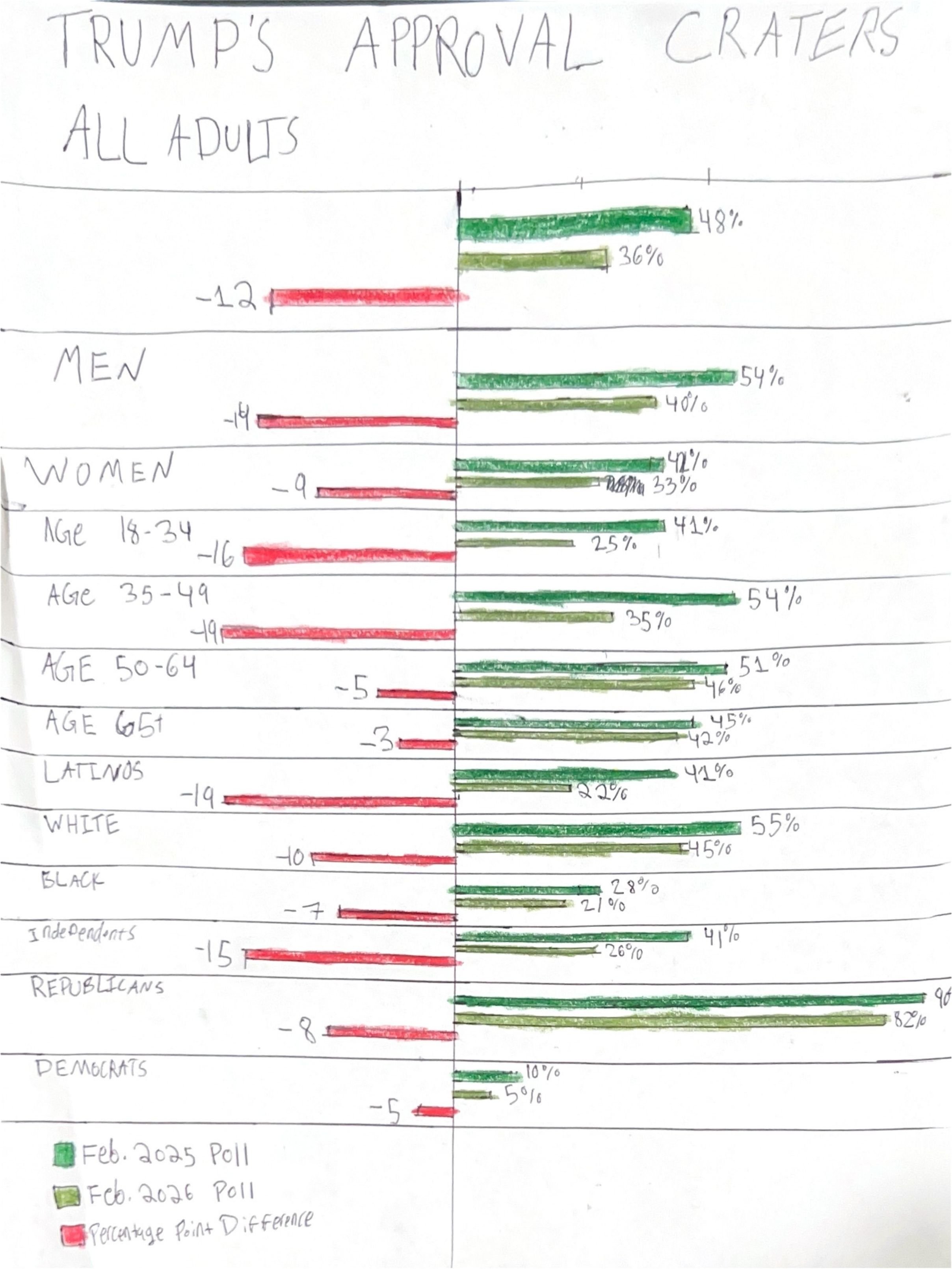
This design has major pitfalls that are due entirely to the medium it was designed in. I am not an artist. I had to buy colored pencils for this, I literally did not own any. Yes, the rows and bars are different thicknesses, yes, you can barely read my handwriting, yes, I scribbled out numbers because I made mistakes. None of these are what I will focus on. There are issues with this design outside of its medium that I discovered through testing it. One classmate, I will refer to them as Student 1: an MSPPM candidate, had a clear understanding of what the chart was attempting to communicate, could quickly see the relationship between each variable, but criticized the choice of color on one ground I did not consier: color blindness. Red-Green color blindeness was their main concern, and I acknowledged that there was very little to distinguish both the two separate polls, as well as the polling information from the difference information. Another peer, Student 2: another MSPPM candidate, could not intuit from the title what the information was, and was therefore confused until they discovered the legend at the bottom. In my testing phase, the misplacement of the legend was a common theme, as putting that same information at the top of the chart would make it much quicker to interpet: my main goal. Conversation died down for a beat until I suggested that I was also thinking of using a mix of this diverging bar chart and a bullet chart, to cut down on the amount of bars and represent the difference multiple, spatial ways. Student 1, when this idea was suggested, responded with “I really like that idea”. With all this feedback in mind, I set forth into Tableau to create my final product.
Part III: Results

The above visualization is my final product, and a direct integration of Student 1’s affirmation of my new bullet-diverging bar chart idea. I personally think this is a better way of representing the data than the original CNN graphic.